
 Home > How to download OnlyFans Videos
Have you ever had the same experience as me, where OnlyFans creators deleted their videos and I ended up losing all the money I spent? After experiencing this a few times, I finally realized that OnlyFans doesn't actually offer a download option. That's why I started to explore methods to download OnlyFans videos and save them forever.
I spent a few days testing different ways to download OnlyFans videos, including browser extensions, screen recorders, and more. Eventually, I found a great tool to download OnlyFans videos safely on MacBook and Windows. Keep reading!
You may also want to know 👉: 12 Best OnlyFans Search Engine to Find OnlyFans Creators

No. You can't download OnlyFans videos through its website, even you purchased the videos. To protect creators copyright, OnlyFans doesn't offer download option for users. That means, if the creators delete videos or their account being banned, the OnlyFans videos you've purchased will also disappear.
In addition, if you access OnlyFans videos through monthly subscription, as long as your subscription ends, you will immediately lose these videos.
This problem had been bothering me for a long time, until I found the following workaround.
After experiencing other tools' blurry videos, bunches of pop-up ads, and malware, I finally found a clean, ad-free, and free OnlyFans video downloader — SameMovie.
SameMovie OnlyFans Video Downloader is the best OnlyFans downloader app I've used to download OnlyFans videos on a MacBook or Windows PC. It allows me to download all types of videos from OnlyFans, as well as download OnlyFans videos from messages, in up to 1080P. They are saved as MP4/MKV files, so I can transfer these OnlyFans videos to any device I like and watch them offline anytime.
After testing, I found that SameMovie even supports downloading some non-DRM OnlyFans videos for free without a subscription. But for those that have DRM protection, a paid version of SameMovie is needed. Plus, I can directly download OnlyFans videos by username. After typing a username in the built-in browser, I can add all videos from that creator and download them with one click.
Check out Comprehensive Review of SameMovie Video One >>

SameMovie OnlyFans Video Downloader
 Download OnlyFans videos on MacBook & Windows and save them forever.Download any OnlyFans videos without ads.Save OnlyFans videos in MP4 or MKV format.Support downloading OnlyFans videos in HD quality up to 1080P.Keep original audio quality and available subtitles where supported.
Step 1 Install SameMovie OnlyFans Video Downloader
Install SameMovie OnlyFans Video Downloader from its official website. Choose OnlyFans as the website, and log in to your account.
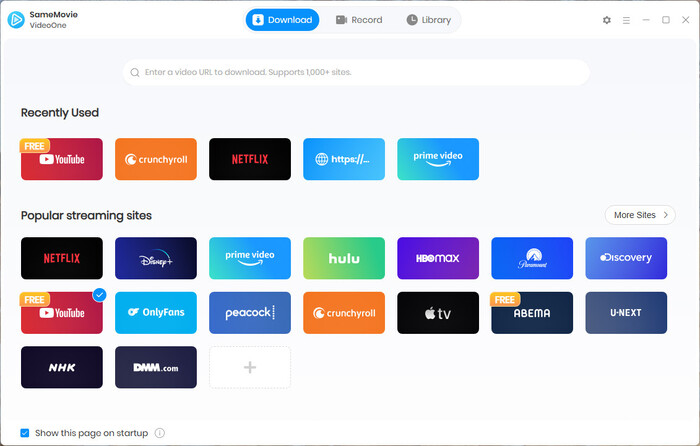
Step 2 Search OnlyFans Videos
SameMovie has a built-in browser, so you can directly type a username or copy and paste the video link to find the video you want to download. After the video is loaded, click Download button in the bottom-right corner.
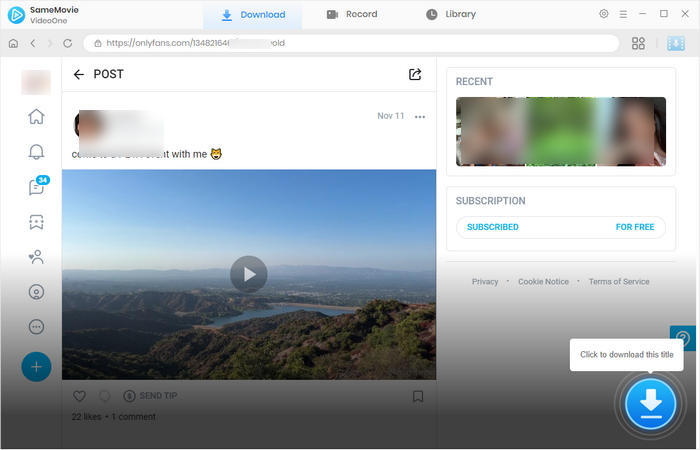
Step 3 Select Your Video
In the new pop-up window, select the OnlyFnas video you want to download. If there are multiple videos, you can download them together.
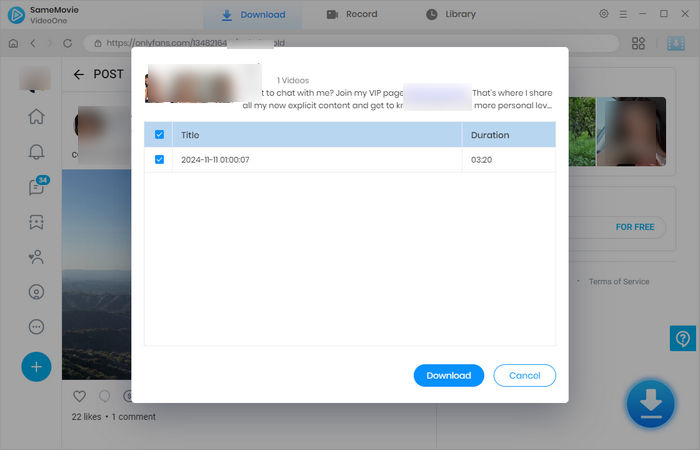
Step 4 Locate Downloaded OnlyFans Videos
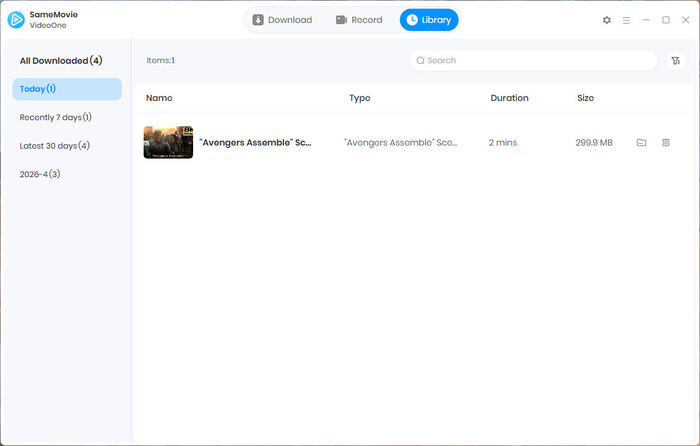
When the OnlyFans videos finish downloading, you can go to the Library tab to find all downloaded files.
That's it. You have successfully downloaded OnlyFans videos on your MacBook or Windows PC. Now you can enjoy these videos offline anytime, anywhere, without worrying about losing them.
It should be used with caution. Generally, downloading OnlyFans videos for personal offline viewing is generally acceptable. However, if you distribute these videos, share them with others, or even sell them, your OnlyFans account may be banned, and you might even violate local laws and be sued. Therefore, when using SameMovie to download OnlyFans videos, always remember that it is for personal offline viewing only and respect creators' copyright.
Yes! You can use SameMovie Streaming Video Recorder to easily record OnlyFans videos on your Windows or Mac without black screens. There is no malware, no watermark, no compression, and the recorded videos are all in high quality.
SameMovie can download non-DRM-protected OnlyFans videos for free without a subscription. To find these videos, you can check free videos, limited-free videos, videos from small creators on OnlyFans, etc.
To download OnlyFans videos on Android, you can consider using the StreamFab OnlyFans Video Downloader Android version. However, according to their website, while downloading OnlyFans videos on Android, there may be more issues related to low success rates, black screens, etc.
Therefore, I recommend downloading OnlyFans videos on MacBook/Windows with SameMovie first. Then transfer the downloaded MP4/MKV OnlyFans video files to Android via USB or Google Drive.
In this article, I talked about the limitations of OnlyFans. Since it doesn't offer a download option, once creators delete the videos, you will lose all the videos and your money. To save OnlyFans videos forever, using a third-party tool like SameMovie is wise.
It has no ads and downloads OnlyFans videos on MacBook/Windows in 1080P. If you want to download OnlyFans videos safely, SameMovie is totally worth considering.



